How to Create a Meme Coin on BSC Without Coding (2026)
How to create a meme coin on BSC without coding: connect a BNB wallet, deploy a BEP-20 for 0.05 BNB plus gas, then add PancakeSwap V2 liquidity. Step by step.

Ready to create on BNB Smart Chain? Set your BEP-20 token details and review the BNB fee before signing.
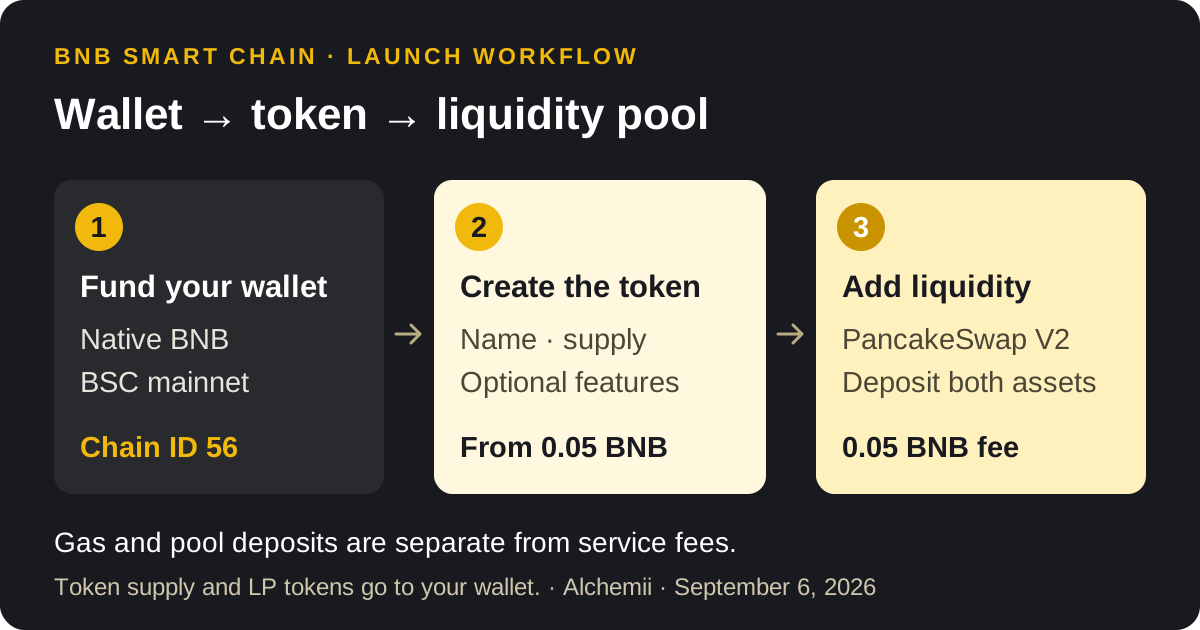
How to create a meme coin on BSC: connect a wallet funded with BNB, deploy a BEP-20 token without writing code, then fund a PancakeSwap liquidity pool if you want people to trade it. With Alchemii, the token creation service starts at 0.05 BNB plus gas. The pool is a separate transaction with a separate deposit.
This guide follows the direct BNB Smart Chain → BEP-20 → PancakeSwap V2 route. BNB Chain's own memecoin launch guide also describes bonding-curve and presale routes. Those have different funding and launch mechanics; this walkthrough is for a token whose initial supply and LP tokens are delivered to your wallet. If you are still deciding whether BSC is the right EVM chain for the coin at all, BSC vs Robinhood Chain measures the two creators side by side on fees, tax caps and pool type before you commit any BNB.
Checked September 6, 2026. We build Alchemii. The factory and liquidity contracts below are deployed on BSC mainnet, with exact source matches on Sourcify. We tested the creation-to-liquidity sequence against those deployed addresses on a local mainnet fork. The operational test transactions were simulated; they were not public mainnet token launches.
What do you need before creating a BSC meme coin?
Prepare a token name, a short symbol, a supply amount, an optional image, and a compatible EVM wallet. You need native BNB on BNB Smart Chain to pay fees and gas. BNB or stablecoins held on a different network will not pay for a BSC transaction.
| Setting | What to use |
|---|---|
| Network | BNB Smart Chain mainnet, also called BSC |
| Chain ID | 56 |
| Gas currency | BNB |
| Explorer | BscScan |
| Token type in this guide | BEP-20 |
| Liquidity pool type | PancakeSwap V2 |
The network values come from BNB Chain's wallet configuration documentation. Testnet is chain ID 97 and uses test BNB; it does not create a mainnet asset.
How to create your meme coin on BSC
1. Open the BSC creator and connect your wallet
Open the BNB Chain Token Creator, choose your installed wallet, and select BNB Smart Chain. MetaMask, OKX Wallet and Binance Wallet are supported connection options for compatible EVM providers. Follow your wallet's network-switch prompt if it is currently on another chain.
Connecting identifies your address. The deployment transaction is the step that creates the token and pays the service fee.
2. Enter the token name, symbol, decimals and supply
The form accepts a symbol of up to 8 characters, decimals from 0 to 18, and a positive supply. Its defaults are 9 decimals and 1,000,000,000 tokens. Change them to match your distribution plan.
Decimals control divisibility. They do not multiply the whole-token supply shown to holders. For example, 1 billion tokens with 9 decimals still means 1 billion whole tokens; each can be divided into 1 billion smaller units. Enter the whole-token amount in the form, without manually appending decimal zeros.
Choose names and artwork you have the right to use. A familiar ticker does not make your contract the same asset as another token with that ticker.
3. Add an image if you want one
The image field accepts JPG or PNG files up to 5 MB. Alchemii uploads the image and links metadata through the deployed token's URI. This is useful provenance, but it does not automatically make every wallet or explorer display the logo. Those services can have their own token-information submission process.
The current template has no function for changing its metadata URI later, so check the image before deployment.
4. Choose the optional token features
All three options are optional and each adds 0.05 BNB to the creation service fee.
| Option | What it changes | What to check before signing |
|---|---|---|
| Burnable | Holders can destroy tokens they own; approved spenders can burn within their allowance | Burning reduces supply; it does not guarantee a higher price |
| Transfer tax | Enables an initial tax from 0.01% to 9%, paid to your chosen recipient | It applies to eligible transfers, including trades; it is not just a buy fee |
| Renounce ownership | Sets the owner to the zero address at creation | You permanently lose owner-only controls, including tax adjustments |
In this template, the original creator, the tax recipient and the fixed Alchemii liquidity manager are tax-exempt. When tax is enabled and ownership is retained, the owner can adjust it within the 9% cap or set it to zero. A token created without the tax option cannot enable it later. There is no additional mint, blacklist or pause function in this template. These properties can be checked against the verified factory and embedded token source.
Renouncing ownership is not required to create a liquidity pool. It affects token administration. LP ownership is a separate question.
5. Review the fee and create the token
The service fee is 0.05 BNB with no options, 0.10 BNB with one, 0.15 BNB with two, or 0.20 BNB with all three. Your wallet also quotes network gas. The BSC meme coin cost breakdown explains the full budget through pool creation.
Click Create Token, review the transaction in your wallet, and confirm. The factory deploys the contract and sends the initial supply to the connected address in the same transaction. Wait for confirmation, then save the resulting token contract address and transaction hash.
Use the result's BscScan link to check the transaction and token balance. The token address is your asset's identifier; the factory address is the tool that created it. Share the token address with your community.
How do you add PancakeSwap liquidity for the meme coin?
Use Create Liquidity on BSC after the token exists. The Alchemii flow uses PancakeSwap V2, whose BSC factory is listed in PancakeSwap's official deployment reference. V3 and Infinity positions use different mechanics and are not interchangeable with this V2 workflow.
- Select your token and the asset to pair it with, such as BNB.
- Enter both deposit amounts. Keep additional BNB for the 0.05 BNB liquidity service fee and network gas.
- Check the deposit ratio and choose your slippage tolerance.
- Approve the token amount if your wallet has not already granted sufficient allowance.
- Confirm the liquidity transaction. Save the pool address and check that your wallet received its LP tokens.
For a new pool, the deposit ratio sets its initial price. An arithmetic example: 100,000,000 tokens paired with 1 BNB gives a starting reserve ratio of 0.00000001 BNB per token. That ratio is not a promise that every token can be sold at that price. Trades change the reserves and price, and a thin pool can move sharply.
Alchemii's liquidity contract transfers LP tokens to the caller. You choose what to do next:
- Remove Liquidity on BSC returns the assets represented by the LP amount you withdraw, subject to current reserves and your minimum-output settings.
- Burn Liquidity on BSC permanently sends the selected LP tokens to the dead address, forfeiting their withdrawal rights.
Burning your LP balance does not prove that every LP position in the pool is locked. Other holders may still control other positions. Inspect the liquidity contract's verified source for the exact operations and fee handling.
Can you create a meme coin on BSC for free, and which route should you use?
“How to create a meme coin on BSC for free” is one of the most-searched variants of this question, and the honest answer is that nothing on mainnet is free of gas. What people mean is one of three routes, each with a different cost shape.
| Route to make a meme coin on BSC | What you pay | What you need | Trade-off |
|---|---|---|---|
| Write and deploy Solidity yourself (Remix plus MetaMask) | Gas only, typically a fraction of a cent to a few cents of BNB at BSC gas prices | Solidity, contract verification on BscScan, and ownership of every bug | Cheapest in BNB, most expensive in time and risk |
| No-code BNB Chain token creator (this guide) | 0.05 BNB plus gas; each optional feature adds 0.05 BNB | An EVM wallet with BNB on chain ID 56 | Fixed fee, verified source on Sourcify, supply and LP tokens delivered to your wallet |
| Bonding-curve launchpad | The platform's launch fee plus a percentage of every trade | An account on the launchpad | No liquidity deposit, but a fixed template and a cut of your volume forever |
BNB Chain's own memecoin launch guide describes the launchpad and presale routes; this article follows the middle row because it leaves the token, the supply and the LP position in your wallet. If a tool advertises a free BSC meme coin creator, read who pays the gas and whether a later fee, a tax on transfers or a share of trading volume replaces the upfront price. The full budget through pool creation is in how much it costs to create a meme coin on BSC, and if you have not committed to BNB Chain yet, the Solana equivalent is about 0.22 SOL all-in through the Solana meme coin creator.
What should you check before sharing the token?
Publish the BSC token address, the pool address, supply, any transfer tax and its recipient, and the ownership setting. Check the same addresses in your wallet and on BscScan. If you make an LP-burn claim, include the transaction and the amount burned.
Creating a BEP-20 token does not list it on the Binance exchange. Creating a pool also does not promise discovery, buyers or a particular chart display time. Treat contract creation, liquidity and third-party listing as separate tasks.
Frequently asked questions
Can I create a BSC meme coin without coding?
Yes. The BSC creator deploys a BEP-20 contract from your form inputs. Your connected wallet signs the transaction; you do not need to write or deploy Solidity yourself.
Which wallets can I use for a BSC meme coin?
Use a compatible EVM wallet such as MetaMask, OKX Wallet or Binance Wallet. Select BNB Smart Chain mainnet, chain ID 56, and hold native BNB on that network for fees and gas.
How much BNB does token creation cost?
Alchemii charges 0.05 BNB plus gas for base creation. Each of the three optional features adds 0.05 BNB, so all three bring the service fee to 0.20 BNB. Liquidity is separate.
How long does it take?
There is no fixed completion time. Preparing the inputs, uploading an image, confirming in your wallet and waiting for the network all contribute. The confirmed transaction is the completion signal. Check a pending transaction before submitting another deployment.
Can I change the token name or supply after creation?
This template fixes the name, symbol, decimals and metadata URI at deployment and has no additional mint function. Holders can reduce supply if burning was enabled. An enabled tax can be adjusted only while an owner still exists, within the contract's cap.
Does creating the token make it tradeable?
You can create and hold the token first. For the direct PancakeSwap route in this guide, a funded pool is needed before other users can swap against that pool. Creating the token alone does not include liquidity.
Do I have to renounce ownership before adding liquidity?
No. Renouncing ownership is optional and removes token owner controls, including tax adjustments. It does not create or lock a pool. LP tokens represent a share of pool reserves; keep, withdraw or permanently burn that LP position as a separate decision.
Can I create a meme coin on BSC for free?
Not on mainnet. Every deployment pays BNB gas, so “free” only ever means that a tool waives its own fee or that you write and deploy the Solidity yourself and pay gas alone. Alchemii's no-code creator charges 0.05 BNB plus gas; a bonding-curve launchpad charges its own fee schedule and a cut of every trade instead. Compare the total including liquidity, not the headline.
Is it cheaper to make a meme coin on BSC or Solana?
Solana, at the creation step. The BSC creator's 0.05 BNB base fee was about $37 at the $742 BNB price read on September 8, 2026, while a standard Solana launch through Alchemii is about 0.22 SOL all-in, roughly $22 at $100 SOL, and about 0.32 SOL with mint authority revoked. Liquidity depth, not the creation fee, decides the real budget on either chain; BSC vs Robinhood Chain covers the other EVM option.
Create your meme coin on BNB Smart Chain
Enter your BEP-20 name, symbol and supply. Review the optional features and BNB fee, then confirm in your wallet. Create a PancakeSwap V2 pool separately when you are ready.
Create my BSC meme coinRelated Topics
BSC meme coin guides covering BEP-20 creation, BNB fees, and PancakeSwap liquidity.
How Much Does It Cost to Create a Meme Coin on BSC? (2026)
Free on four.meme and Flap.sh apart from cents of gas, 0.05 BNB to own your BEP-20, and a median 3.5 BNB of liquidity: real BSC launch costs from on-chain data.
BNB Meme Coins 2026: Market Data & Launch Guide
BNB meme coins are back: BSC launchpad fees hit $1.59M a day in September 2026, 87% on Flap.sh. Read the BNB Chain data, then launch your own BEP-20 token.
BSC vs Robinhood Chain: Where to Launch a Token (2026)
BSC vs Robinhood Chain for a token launch, read on both chains the same hour: 0.05 BNB vs 0.015 ETH fees, 9% vs 25% tax caps, PancakeSwap V2 vs Uniswap V3.