How to Create a Solana SPL Token (2026 Guide)
Step-by-step guide to create a Solana token: every form field explained, which authorities to revoke, what it costs to mint an SPL token in 2026.

Ready to create your Solana token? Enter your token details, choose your authority options, and confirm in your wallet.
Creating a Solana SPL token means initializing a new mint account inside the shared SPL Token Program — no smart contract deployment is required, and a standard launch costs roughly 0.22 SOL end-to-end. That covers Solana network fees, the Metaplex metadata account rent, and the flat one-time service fee for a no-code creator. Optional extras — revoking authorities — add a flat amount on top and are itemized on the form before you connect a wallet. The standard memecoin configuration is 1B supply, 6 decimals (matching USDC), all three authorities (mint, freeze, update) revoked, and a 512×512 image pinned to IPFS. The on-chain transaction confirms in 1–2 seconds, after which most parameters cannot be changed. Always verify the resulting mint address on Solscan before sharing it.
The official Solana docs assume you're a Rust developer. The no-code tools assume you don't care what the form fields mean. Neither is helpful when you're about to spend a fifth of a SOL and put your name onto a token that's permanent the moment you sign.
So here's the actual walkthrough — every field, what it does on-chain, what to pick if you don't have an opinion, and where the irreversible decisions are. We've launched enough tokens with this exact tool to know which mistakes are common and which ones cost real money.
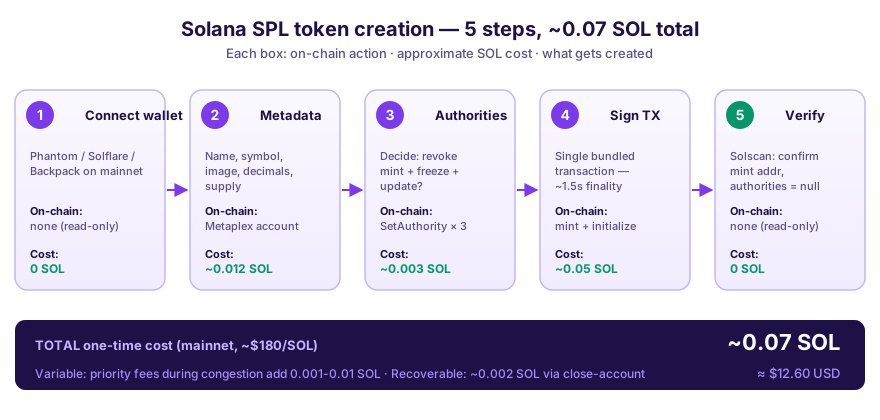
The five steps below map 1:1 to the actions you'll sign in your wallet. Authorities (Step 3) is where the irreversible decisions live — revoking is a one-way door, so anyone telling you to "just revoke everything" without explaining the trade-offs is skipping the part that actually matters.
What is an SPL token?
SPL stands for "Solana Program Library." An SPL token is roughly the Solana equivalent of an ERC-20 on Ethereum — a fungible token, governed by the SPL Token Program. Every memecoin, stablecoin, governance token, and utility token on Solana is an SPL token.
The big mental shift coming from Ethereum: there's no contract to deploy. On Ethereum every ERC-20 ships its own bytecode. On Solana, all tokens share one program — creating a token just means writing a new "mint account" into that shared program. That's why it costs a few cents in network fees instead of $50–200, and why nobody asks you to write Rust. The protocol details are in the official Solana docs if you want to go deeper, and the account-level picture — mint account, token accounts and ATAs, the Metaplex PDA, and the three authority fields as one connected model — is laid out in what an SPL token actually is on-chain. (Still weighing which chain to launch on? The cost-and-control comparison against Ethereum, Base, and BSC is one section down.)
Real-world reference: BONK is 100T supply, 5 decimals. WIF is 1B supply, 6 decimals. Both are mint accounts in the same program — every parameter that distinguishes them is just a config value you'll set in the next 5 minutes.
Solana vs other chains (and why "coin" usually means "token")
Two vocabulary points first, because they change what's possible. A coin is the native asset of an L1 chain — SOL on Solana, ETH on Ethereum, BNB on BNB Chain — and creating one means launching a chain, which needs a validator team rather than a form. A token is anything minted on top of an existing chain. If you came here searching for how to create a coin, you want a token, and everything below applies.
The second point is which chain to mint it on. Rough all-in numbers for a full launch (mint + liquidity pool + burned LP). Solana is quoted in SOL, and most of that full-launch figure is the liquidity you seed rather than fees; EVM gas varies by the hour:
| Chain | Mint only | Full launch (mint + LP + burn) | Block time | Best for |
|---|---|---|---|---|
| Solana | ~0.22 SOL | ~5.7 SOL | ~400ms | Memecoins, fast launches, budget launches |
| Base | $4–$15 gas | $40–$120 | ~2s | First-time buyers arriving through Coinbase |
| BSC | $3–$10 gas | $30–$80 | ~3s | BNB-native communities |
| Ethereum mainnet | $30–$200 gas | $400–$2,200 | ~12s | Established treasuries, EVM-native audiences |
Three questions settle it for most launches. Are your buyers crypto-native, or first-timers with no wallet at all? First-timers arrive more easily on Base. Is the launch budget tight? Then Solana, where the mint-side cost is a fraction of a SOL and fixed in advance rather than an unpredictable gas bill. Do you need sub-second finality — memecoin launch, sniper-resistant pricing, fast retries? Solana's ~400ms slots make frontrunning your LP-add materially harder than Ethereum's ~12s blocks do. Beyond that it's audience gravity: launch where your holders already keep funds. The side-by-side mechanics are in Solana token vs Ethereum ERC-20.
Pick deliberately, because chain choice is the one decision here with no migration path. Moving a token to another chain means a fresh launch plus asking every holder to swap voluntarily, and most won't. The rest of this guide is Solana.
What you need before you start
- A Solana wallet. Phantom, Solflare, or Backpack are the most popular. Install the browser extension, write down your seed phrase somewhere physical (not in cloud storage), and fund it with at least 0.6 SOL if you're taking the recommended memecoin config with authorities revoked (0.3 SOL covers a plain launch with no extras). The create flow checks your balance before it builds the transaction, so funding light just gets you an insufficient-balance error.
- Your token's basic info:
- Name (e.g. "Doge Capital")
- Symbol / ticker (e.g. "DOGE", 3–5 characters is standard)
- Image (PNG or SVG, 512×512px works everywhere)
- Description (short — 1–2 sentences)
- Optional: website, Twitter, Telegram links
- A decision on supply. Most memecoins use 1 billion (1,000,000,000) for the same reason memes use round numbers — it looks good. If your token has actual utility, pick a supply that matches your tokenomics.
Step 1: Connect your wallet
Open Alchemii's Solana Token Creator and click "Connect Wallet" in the top-right. Choose your wallet, approve the connection request. The site never sees your private key — wallet adapters only ask for permission to request signatures, which you approve transaction-by-transaction.
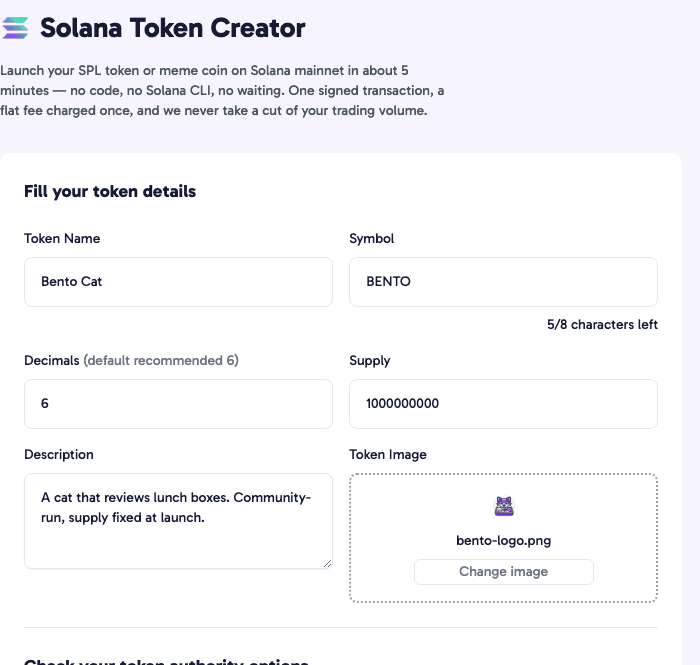
Step 2: Fill in the metadata
Most guides hand-wave through this. Here's what each field actually does to the token.
Name and symbol
These get written to the token's on-chain metadata account. To change them later you'd need to keep update authority (covered in step 3), and most memecoin launches revoke that. So treat these as permanent. Pick names you can live with for years — and proofread before you sign, because typos are forever too.
Decimals
Decimals control how divisible your token is. The thing that trips everyone up: the supply you enter into the form is in whole tokens, but on-chain Solana stores everything in the smallest indivisible unit.
A token with 6 decimals and a supply of 1,000,000,000 actually exists on-chain as 1,000,000,000,000,000 units — one-millionth of a token is the smallest piece anyone can hold or trade. A token with 0 decimals and the same 1B supply is exactly 1B indivisible units; no fractional balances ever.
For 99% of memecoins, use 6 decimals. It matches USDC, it matches what wallets and aggregators expect, and it matches what BONK, WIF, and basically every Solana memecoin uses. Use 0 only if fractional ownership genuinely shouldn't exist — ticket tokens, voting rights, NFT-adjacent things.
Supply
The total number of tokens minted in the same transaction that creates the mint account. If you revoke mint authority right after (recommended for memecoins, covered below), this number is the supply forever — no inflation possible.
Image and metadata URI
Alchemii pins the image to IPFS, builds the JSON metadata file, and writes the URI into the token's Metaplex metadata account in the same transaction. Metaplex is the de facto standard for Solana token metadata — it's what Phantom, Jupiter, DexScreener, Birdeye, and Solscan all read to display your logo and name. Skip the metadata step (some bare CLI flows do) and your token shows up in every wallet as "Unknown Token" forever — a fixable but annoying mistake we cover in the Phantom troubleshooting guide.
Step 3: Configure authorities
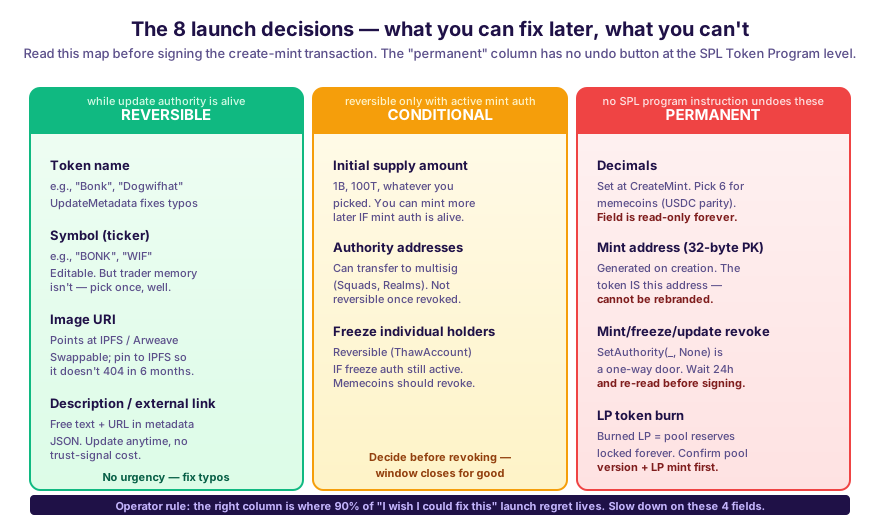
This is the part most guides skip, and it's the part that actually matters for whether anyone trusts your token. Solana SPL tokens have three authorities — three keys that retain power over the token after launch. Each one is a separate decision: keep it, or burn it forever.
Mint authority
Whoever holds mint authority can mint more tokens whenever they want, diluting every existing holder. Keep it = you can grow supply later. Revoke it = the supply you set is the supply forever.
For memecoins, revoke. Holders aren't going to buy a token where the dev can print infinite supply at any time — and any halfway-serious trader checks this before buying. For governance or utility tokens with a real inflation schedule, keep it, but put it on a Squads multisig so it's not a single-key risk.
Freeze authority
Whoever holds freeze authority can freeze any holder's tokens — preventing them from selling or moving anything. The legitimate use case is regulated stablecoins (Circle freezes USDC accounts on OFAC sanctions). For a memecoin, it's a rug vector with no upside. Holders see active freeze authority and assume the worst, often correctly.
Revoke. Always, for memecoins and community tokens. The only reason not to is if you genuinely have a regulatory reason.
Worth knowing how this is handled here: Alchemii's create transaction passes null as the freeze authority in the same instruction that initializes the mint, so a token made through this flow is born without one. There is no separate revoke step to forget, and no window between mint and revoke in which anyone — us included — could freeze a holder's account. The whole instruction list, and what it means that no Alchemii-controlled program appears in it, is in Alchemii's security and custody model.
Update authority
Whoever holds update authority can change the token's name, symbol, image, and metadata after launch. Useful for fixing typos or rebranding. Risky if the key gets compromised — someone who steals it can rename your token to anything, point the image to anything, and there's no rollback.
This one's more genuinely a judgment call. If branding is final and proofread, revoke. If you might want to rebrand or update the image later (better art, new mascot, whatever), keep it on a multisig. We default to revoke for pure memecoin launches and keep on multisig for everything else.
Step 4: Sign the transaction
Click "Create Token" and your wallet pops up a signature request. The single transaction bundles four operations: it creates the mint account, creates the Metaplex metadata account, mints the full initial supply to your wallet, and revokes whichever authorities you ticked.
Approve. Solana confirms in 1–2 seconds. You get a success screen with your token's mint address — which you should now copy somewhere safe before you accidentally close the tab.
Step 5: Verify on-chain
Don't share the mint address until you've checked it. Open Solscan or Solana Explorer, paste your mint address, and confirm:
- Total supply matches what you set
- Decimals match
- Image, name, symbol render correctly
- Mint authority shows
nullif you revoked it - Freeze authority shows
nullif you revoked it
If you'd rather read those fields as a verdict than hunt for them in an explorer, paste the mint into the Solana token audit checker. It reads mint authority, freeze authority, metadata completeness, and LP burn status straight off mainnet and returns a four-checkpoint card — the same card a cautious buyer will pull on you, so it's worth seeing your own token through it before you post the address anywhere.
If anything is off, you can still re-mint as a different token — nobody's traded the wrong one yet. The moment someone buys and posts it on Twitter, you're locked in. We've watched people skip this 30-second check and end up with a token where decimals are wrong or the image is broken, and there's no fix that doesn't involve abandoning the token entirely.
What it costs in 2026
Realistic numbers as of mid-2026:
| Cost item | Approximate |
|---|---|
| Solana on-chain cost (mint rent + Metaplex metadata PDA + ATA rent + signature) | ~0.0191 SOL |
| Alchemii service fee (flat, one-time) | 0.2 SOL |
| Standard launch, all-in | ~0.22 SOL |
Optional extras — the authority revocations from Step 3 — add a flat amount on top, itemized on the form before you connect a wallet. The typical memecoin config with mint authority revoked comes to roughly 0.32 SOL, and ticking every extra tops out around 0.52 SOL.
This is one-time, and it's flat: no percentage of your trading volume, no cut of every buy and sell the way a bonding-curve launchpad takes one. There is no monthly cost for keeping your token live either — the rent on Solana accounts is paid up-front and recovered when the account is closed. To estimate your full launch budget in SOL (creation + LP seed + buffer), run the Solana token cost calculator.
Cost breakdown visualized
What a launch actually costs, by configuration.
Toggle: launch outcomes by config choice
What to do next
Minting the token is step one of about ten. The token now exists, but nobody can buy it yet — to make it tradable you need a liquidity pool, and to make people trust the pool you need to burn the LP tokens.
Create a Raydium pool is the next stop. The decisions there matter as much as the ones you just made: initial price (which sets your launch market cap), fee tier (1% is the memecoin convention), and quote token (SOL is universal, USDC is for serious projects). Then burn the LP — the single strongest "I won't rug" signal on Solana, walked through in full in the LP burn guide.
After that the technical work is mostly done. DexScreener and Jupiter pick up your pool automatically within a few minutes. From here it's marketing, community, and patience — the parts no tool can shortcut. The full sequence from mint to visibility — pool, LP burn, listings, and the order to do them in — is laid out in how to launch a token on Solana.
One expectation to set before you plan a launch push: tradable and visible everywhere are different milestones. The pool is tradable the second liquidity exists. Wallet-level recognition lags — Phantom's indexing pipeline runs roughly a 30-day window before a new token reliably resolves by ticker instead of showing as unknown, and Jupiter's strict-list review typically takes 1–2 weeks. Budget a 1–4 week visibility ramp on top of launch day rather than assuming minute-zero reach.
Quick Facts (verifiable specifications)
| Specification | Value | Source |
|---|---|---|
| Standard launch, all-in (token + metadata + fees) | ~0.22 SOL | This article |
| Typical memecoin config (mint authority revoked) | ~0.32 SOL | This article |
| Every optional extra selected | up to ~0.52 SOL | This article |
| Solana on-chain protocol cost (rent + signature) | ~0.0191 SOL | This article |
| Standard memecoin supply | 1,000,000,000 (1B) | This article |
| Standard memecoin decimals | 6 (matches USDC) | This article |
| Confirmation time | 1–2 seconds | This article |
| Recommended wallet funding | 0.6 SOL with revocations; 0.3 SOL for a plain launch | This article |
| Standard image size | 512×512 PNG | This article |
| BONK example | Supply 100T, decimals 5, Solscan | This article |
| WIF example | Supply 1B, decimals 6, Solscan | This article |
| Protocol reference | SPL Token Program | spl.solana.com |
| Metadata standard | Metaplex Token Metadata | developers.metaplex.com |
Limitations of this guide (what it doesn't cover)
This guide focuses on creating a vanilla SPL token on Solana mainnet via a no-code flow. It does not cover:
- Token-2022 / Token Extensions. Transfer fees, confidential transfers, interest-bearing tokens, and other extensions live in a separate program. See SPL Token vs Token-2022 for when to choose which.
- Liquidity pool creation and LP burn. Required to make the token tradable, but a separate workflow. See How to add liquidity to Raydium and How to burn LP tokens on Solana.
- Multisig setup for retained authorities. If you keep mint or update authority on a Squads or Realms multisig, the configuration is outside this guide's scope.
- Marketing, community building, and listings. Getting holders is a separate problem from minting the token.
- Non-Solana chains. This guide is Solana-only — Ethereum ERC-20s, BSC BEP-20s, and other chains use different tooling.
- Securities-law and regulatory analysis. Jurisdiction-dependent and not legal advice. Consult a lawyer if you're targeting regulated users.
Sources & references
- Solana docs — token program intro — SolanaThe official protocol-level documentation for the SPL Token Program.
- SPL Token Program reference — Solana LabsDetailed SPL Token spec covering mint, freeze, supply, and authority semantics.
- SPL Token Program source — GitHub / Solana ProgramOpen-source reference implementation.
- Solana network fees — Solana docsBase 5,000-lamport signature fee documentation.
- Metaplex Token Metadata — Metaplex FoundationThe standard for naming, image URI, and social link metadata for Solana tokens.
- Solana rent-exempt minimums — Solana docsWhy mint accounts cost ~0.00204 SOL of rent (rent-exempt deposit).
- Why most Solana memecoins die in 24 hours — AlchemiiSource for the survival-rate-by-config statistics in the toggle chart above.
- Phantom wallet — PhantomMost popular Solana wallet — supports all the token operations described here.
- Solflare wallet — SolflareAlternative Solana wallet with full SPL support.
- Backpack wallet — BackpackNewer Solana wallet popular with developers.
- Solscan token explorer — SolscanVerify any token's authorities, supply, decimals, holders, and metadata.
- Solana Explorer — Solana FoundationThe official Solana block explorer — alternative to Solscan.
- Jupiter (DEX aggregator) — JupiterMost Solana wallets route swaps via Jupiter — your token must be indexed here to be swappable.
- DexScreener — Solana — DexScreenerWhere new Solana tokens get discovered post-launch.
- Birdeye Solana — BirdeyeToken discovery and analytics — alternative to DexScreener.
- Solana devnet faucet (solfaucet.com) — Sol FaucetFree devnet SOL for testing the flow before mainnet.
- BONK token — SolscanReal-world example: 100T supply, 5 decimals.
- WIF (dogwifhat) token — SolscanReal-world example: 1B supply, 6 decimals — the convention this guide recommends.
- Alchemii Solana Token Creator — AlchemiiThe no-code tool that bundles all the steps into one transaction.
- Pump.fun docs (pump.fun/docs) — Pump.funReference for the alternative bonding-curve launch model mentioned in the comparison.
- Squads Protocol (multisig) — SquadsIf you keep authorities active, putting them on a Squads multisig is the standard production setup.
- Realms governance — RealmsAlternative governance/multisig setup for retained authorities on serious Solana projects.
FAQ
What is the easiest way to create a Solana SPL token?
A no-code creator like Alchemii is the easiest path: fill in name, ticker, supply, decimals, and image, then sign one transaction. A standard launch costs about 0.22 SOL all-in, one time, and the whole process takes under five minutes. The alternative is the spl-token CLI plus the Metaplex SDK, which works but requires writing code and several hours of setup.
What is the standard supply and decimals for a memecoin?
1 billion total supply with 6 decimals is the de facto Solana memecoin standard. The 6-decimal choice mirrors USDC and keeps prices readable in DexScreener. Supply itself is a marketing decision (some launches use 1 trillion for psychological effect); decimals should be 6 unless you have a specific tokenomics reason to deviate.
Do I have to revoke mint and freeze authorities?
For memecoins, yes — almost always. In the 50,000-launch observational sample behind our launch-data methodology, mint-authority revocation is associated with 4.2× the 24-hour survival rate and freeze-authority revocation with 3.1×, each measured on its own. Those are correlations drawn from launches we did not run, not proven causes — but they line up with what traders say they check. For utility tokens with planned inflation (game rewards, staking), keep mint authority but place it behind a multisig like Squads. Update authority can stay active if you may need to fix metadata later.
What is Metaplex metadata and do I need it?
Metaplex metadata is a separate on-chain account attached to your mint that stores name, ticker, image URL, and description. Wallets like Phantom and explorers like Solscan read it to display your token properly. Without metadata your token shows as 'Unknown SPL Token' in every wallet — so yes, you need it. Most no-code creators bundle metadata into the same transaction.
How long does it take to create a Solana SPL token?
About 1-2 minutes for the on-chain transactions: mint creation, metadata write, and authority revokes are all subsecond Solana transactions. The full hands-on process — choosing name, ticker, image, deciding on authorities — typically takes 5-10 minutes total. The slowest step is usually deciding what to name it.
What is the difference between a coin and a token?
A coin is the native asset of an L1 chain: SOL on Solana, ETH on Ethereum, BNB on BNB Chain. Creating one means launching a chain. A token is anything minted on top of an existing chain — USDC and BONK are both SPL tokens inside the same Solana program. Almost everyone searching for how to "create a coin" wants a token, which takes one signed transaction and about 0.22 SOL on Solana.
Ready to launch? Open the Solana Token Creator → — or jump straight to the Solana meme coin creator if you're launching a memecoin and want pre-filled defaults (1B supply, 6 decimals, revoked authorities).
Do I need to know how to code?
No. Alchemii's token creator is a no-code form. Everything that would otherwise require Rust or Solana CLI is handled for you.
Can I create a token on devnet first to test?
Yes — switch your wallet to Solana devnet and the same flow works with worthless devnet SOL. Get devnet SOL from solfaucet.com.
What happens if I make a typo in the name?
If you kept update authority, you can fix it. If you revoked update authority, the typo is permanent. Always double-check before signing the final transaction.
How long until my token shows up on Phantom/Solflare?
Wallets pull metadata from on-chain Metaplex accounts, so name and image usually render within a few minutes for anyone who pastes your mint address. Broad recognition is slower: Phantom's indexing window runs roughly 30 days before a new token is reliably searchable by ticker, and Jupiter's strict-list review typically takes 1–2 weeks.
Is creating a token reversible?
No. Solana transactions are final. Once your token's mint account exists, it exists forever. The only way to "undo" is to abandon the token and create a new one — which means anyone holding the old one keeps it.
Create your Solana token
Choose your token name, symbol, supply and image. Review the authority options and creation fee, then confirm the transaction in your wallet. Liquidity is a separate step.
Related Topics
More guides to Solana token creation, authorities, liquidity, and meme coin launches.
Raydium Token Launch: The 5-Step Playbook (2026)
End-to-end Raydium token launch flow: mint your SPL, configure metadata, seed a Raydium pool, burn LP, and get listed on Jupiter. Total cost ~0.72 SOL.
Create a Solana Token With the spl-token CLI (2026)
The full spl-token CLI path to a Solana token: the commands, the post-rent-cut cost of 0.0163 SOL verified on-chain, why your mint shows as Unknown Token.
How to Trade Solana Meme Coins: Buy, Sell, Survive (2026)
How to buy and trade Solana meme coins in 2026: where to buy, the five-step swap, the pre-buy rug checklist, real fee math, and the survival stats nobody prints.
How to Launch a Token on Solana That Isn't a Memecoin
Launch a Solana token built to last: authority strategy, decimals, supply, vesting and liquidity for game, governance, loyalty and creator tokens in 2026.
How to Copy a Trending Pump.fun Coin in 2026 (60 Seconds)
Copy a trending Pump.fun coin in under a minute: one click prefills the token creator with name, ticker, image and settings — plus an optional pump-suffix mint.
How to Find Trending Pump.fun Coins Fast (2026)
How to find trending pump.fun coins in 2026: the four signals that matter, where to look, and why a trending board is a receipt rather than a forecast.