Solana Burn Wallet: What It Is, How to Verify
The Solana burn wallet (1nc1nerator) explained: what it is, why tokens sent there are gone forever, and how to verify any LP or supply burn on Solscan.

Ready to create your Solana token? Enter your token details, choose your authority options, and confirm in your wallet.
The Solana burn wallet is 1nc1nerator11111111111111111111111111111111 — a 32-byte address constructed entirely from 0x01 bytes, making it mathematically impossible to derive a private key for it. Any SPL token or LP receipt sent there becomes permanently inaccessible. For supply burns, the cleaner mechanism is the SPL Token Program's formal Burn instruction, which reduces the mint account's supply field atomically in the same transaction. For LP burns, both the incinerator transfer and the direct Burn instruction achieve the same irreversible outcome: the pool's liquidity is permanently locked, no one can redeem the underlying SOL and tokens, and the Raydium constant-product formula continues operating indefinitely.
Quick Facts
| Spec | Value |
|---|---|
| Burn wallet address | 1nc1nerator11111111111111111111111111111111 |
| Address type | All 0x01 bytes — not a valid Ed25519 keypair |
Supply effect (formal Burn instruction) | Reduces mint supply field atomically |
| Supply effect (incinerator transfer) | Supply counter unchanged — tokens inaccessible |
| Reversible? | No — no private key, no recovery path |
| Primary use case | LP burn trust signal; supply reduction |
| How to verify on Solscan | Filter by Burn instruction on mint, or check incinerator balance in Holders tab |
Across our 47 launches (12 paid client engagements — see the methodology page for the breakdown), the burn wallet question comes up in roughly every third onboarding conversation. Founders have heard "burn the LP" and "burn the supply" and often conflate them. This article draws the line between those two distinct mechanics and gives you a concrete checklist for verifying either one.
What the Solana Burn Wallet Actually Is

The address 1nc1nerator11111111111111111111111111111111 is 32 bytes, each set to value 0x01. That byte pattern does not land on the Ed25519 elliptic curve that Solana uses for keypair derivation. No corresponding private key exists — not one that's unknown, one that literally cannot exist under the curve's constraints. That's the property that makes it a credible burn destination rather than just a wallet someone else controls.
The SPL Token Program (TokenkegQfeZyiNwAJbNbGKPFXCWuBvf9Ss623VQ5DA) exposes two different ways to permanently remove tokens from circulation:
-
The formal
Burninstruction. Deducts the specified amount from the token account balance and from the mint'ssupplyfield in the same atomic instruction. On Solscan you see the supply number drop. This is what you want for supply burns — it's unambiguous and thesupplyfield is what CoinGecko, Birdeye, and analytics tools pull to calculate circulating supply. -
Transfer to the incinerator address. Moves tokens to
1nc1nerator..., but the mint'ssupplyfield does not change. The tokens are inaccessible (no private key), but they still exist in the supply count. Analytics tools may or may not exclude this balance from their circulating-supply figure — it depends on the tool.
For LP burns specifically, the distinction matters less than it might seem. Raydium's LP token mint tracks its own supply, and burning LP tokens against that mint — either via the Burn instruction or by transferring to the incinerator — removes the LP receipt. The pool's reserves (your project token + SOL) remain locked in the pool account. No one can redeem them without a valid LP receipt.
The constant-product formula governing the pool is k = x × y. After an LP burn, k is preserved: the pool keeps trading at market-determined prices, trading fees continue accruing inside the pool, and the depth of liquidity is permanent. This is covered in the Raydium pool creation docs and it's exactly the reason LP burn is the strongest credibility signal a memecoin can send.
One detail that trips up a lot of people: the Token-2022 program (TokenzQdBNbLqP5VEhdkAS6EPFLC1PHnBqCXEpPxuEb) also has a Burn instruction, but its behavior differs slightly for tokens with the transfer-fee extension enabled. This article focuses on the original SPL Token Program — Token-2022 burn mechanics are out of scope (see Limitations).
The SPL Token Program source code handles both Burn and Transfer in processor.rs. The burn path explicitly writes mint.supply = mint.supply.checked_sub(amount) — that atomic decrement is what makes the formal burn instruction more transparent for on-chain analytics than a plain transfer to the incinerator.
PumpSwap takes a different path than a manual burn: when a Pump.fun token graduates at ~411 SOL of market cap (about $41K at ~$100/SOL, after ~85 SOL of buy volume), the Pump.fun program sends the graduation pool's LP tokens directly to 1nc1nerator11111111111111111111111111111111. You don't sign that transaction — the protocol does. What is PumpSwap covers the graduation mechanics in detail. The result is identical from a verification standpoint: the incinerator holds LP tokens for that pool, and no one can withdraw the underlying liquidity.
SPL Token Program — Burn path (simplified)

  Token Account Balance:   50,000,000
  Mint Supply:            100,000,000
             |
             | Burn instruction (50M tokens)
             v
  Token Account Balance:            0
  Mint Supply:             50,000,000
  ← supply field updated atomically →

  vs. Transfer to 1nc1nerator:

  Token Account Balance:            0  (tokens moved)
  Mint Supply:            100,000,000  (supply field unchanged)
  incinerator balance:     50,000,000  (inaccessible, no private key)
Burn instruction vs incinerator transfer — the supply field behaves differently. Source: SPL Token Program processor.rs on GitHub.How to Verify a Burn Went to the Burn Wallet
Solana's finality is 1-2 seconds per the Solana transactions docs. The on-chain state is authoritative within that window. What varies is how quickly the secondary indexers — DexScreener, Birdeye, Phantom — catch up. DexScreener's "LP burned" badge can lag 15-30 minutes behind the on-chain event (this is an observed range, not an SLA DexScreener publishes). Phantom's indexing window for new tokens stretches up to 30 days.
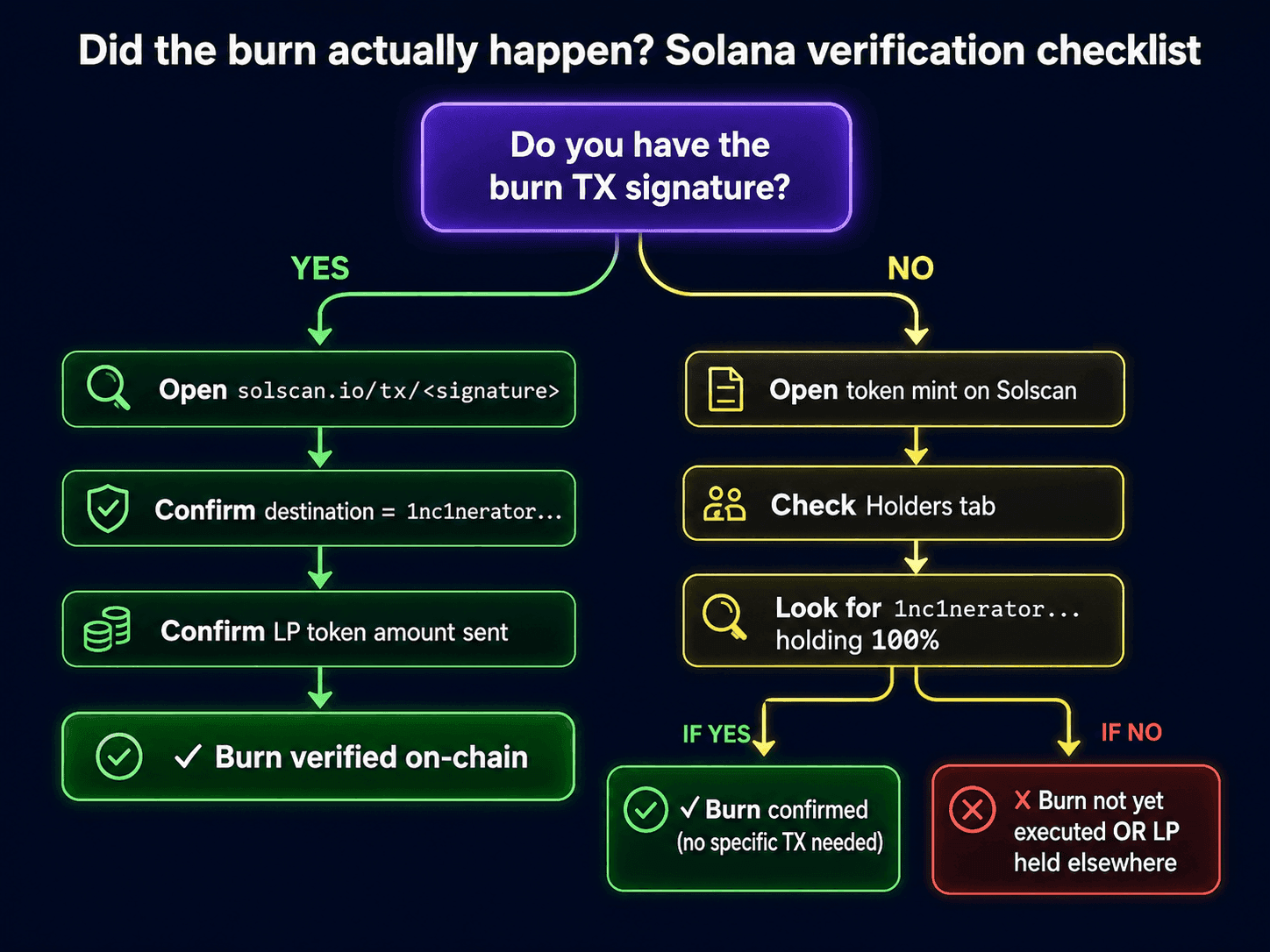
The checklist below works from the authoritative source (the chain itself) out to the secondary indexers. If you're a buyer verifying someone else's burn claim, start at step 1 and stop when you have enough signal. If you're a project verifying your own burn before announcing, run all five.
Did the burn actually happen? Solana verification checklist
STEP 1 — Do you have a transaction signature?
  ├── YES → Go to solscan.io/tx/<signature>
  │         ├── Find "Burn" in the instruction list?
  │         │     YES → Check the amount and mint address.
  │         │           Is the mint address the LP token mint for your pool? → Confirmed LP burn.
  │         │           Is it the project token mint? → Confirmed supply burn.
  │         │     NO  → Look for a "Transfer" instruction with destination 1nc1nerator11111111111111111111111111111111
  │         │           Found? → Tokens sent to incinerator (supply field unchanged — note this).
  │         │           Not found? → This TX is not a burn TX. Look up a different signature.
  │         └──
  └── NO → Go to solscan.io/token/<mint-address>, click Holders tab.
            Is 1nc1nerator11111111111111111111111111111111 in the list?
              YES → Tokens were sent to incinerator. Click the address to see the transfer TX.
                    Is the balance proportional to the claimed burn amount? → Plausible.
                    Is it a trivial amount (dust)? → Not a meaningful burn.
              NO  → Go to the token's transaction history. Filter by instruction type = "Burn".
                    Found Burn instructions? → Check the total amount burned vs total supply.
                    No Burn or incinerator transfer found → Burn claim is unverified.

STEP 2 — Verify the supply drop (for formal Burn instruction only)
  Go to solscan.io/token/<mint-address>
  Check the "Supply" field.
  Compare against the token's documented initial supply.
  If supply dropped by the claimed amount → Formal Burn instruction was used. ✓

STEP 3 — Cross-check on Solana Explorer (second source)
  Go to explorer.solana.com/address/1nc1nerator11111111111111111111111111111111
  Filter token accounts. Is the burn wallet holding tokens from this mint? → Corroborates step 1.

STEP 4 — LP burn: check DexScreener (15-30 min lag)
  Go to dexscreener.com/solana/<pool-address>
  Is "LP Burned" badge visible on the pair card? → DexScreener has indexed and confirmed the LP burn.
  No badge yet but on-chain TX exists? → Wait. The badge lags the chain by up to 30 min.
  Still no badge after 1 hour? → Pool may not meet DexScreener's ~$500 TVL indexing floor.

STEP 5 — LP burn: check Birdeye as tiebreaker
  Go to birdeye.so/token/<mint-address>
  Check the "Locked Liquidity" or "LP Burned" indicator for your pool.
  Birdeye and DexScreener use different indexing pipelines — if one shows the burn, the other
  should follow within 30-60 minutes.
The BONK mint on Solscan (DezXAZ8z7PnrnRJjz3wXBoRgixCa6xjnB7YaB1pPB263) is a good calibration example. BONK launched with a 100T initial supply at 5 decimals. The supply reductions visible on Solscan's BONK token page show the formal Burn instruction at work — the supply field drops, not just the holder balance. CoinGecko's BONK page reflects the reduced circulating supply because CoinGecko reads the mint's supply field.
One honest caveat: the verification checklist above works for Raydium AMM v4 pools and for direct SPL token burns. If the token uses the Token-2022 program with confidential-transfer or transfer-fee extensions, the Solscan display differs and supply figures may be harder to read at a glance. That edge case is out of scope here.
If you're a project doing the burn rather than verifying someone else's, burn your Raydium LP with alchemii — the tool produces the Solscan TX URL on confirmation, which is the first artifact you need for the proof chain described in Solana LP burn proof: what to share after you burn.
A quick story on why I push the "paste the TX URL, not just the screenshot" rule. Early 2024, I was helping a friend launch a small community token. He burned the LP, took a screenshot of the DexScreener "LP Burned" badge, posted it to the Telegram, went to sleep. Two people in chat called him out within an hour — said the screenshot could be a different token's badge, demanded the TX. He didn't have it saved. He had to go back to his wallet history, find the burn transaction, and post it three hours later. Token survived but holder trust took a real hit. The Solscan TX URL is two extra characters to copy and it kills that entire class of FUD before it starts. Just paste the link.
Burn Wallet vs. Other "Dead" Address Patterns
Not every address that tokens "disappear into" is equivalent to the incinerator. This distinction matters when you're evaluating a project's burn claim — a transfer to a random low-activity wallet looks like a burn in your feed but is not on-chain proof of anything permanent.
| Destination | Private key exists? | Supply field drops? | Recovery possible? | Used by |
|---|---|---|---|---|
1nc1nerator11111111111111111111111111111111 | No (not on Ed25519 curve) | Only with formal Burn instruction | No | Solana LP burns, supply burns |
SPL Burn instruction (no destination) | N/A — tokens destroyed | Yes — atomically | No | BONK, USDC supply management, most reputable burns |
11111111111111111111111111111112 (System Program / null address) | Effectively no | No | Effectively no (but edge cases exist) | Early Solana lore; not recommended for token burns |
| Multisig vault (e.g., Squads) | Yes — multisig signers | No | Yes — multisig vote | LP locking (not burning) |
| Time-lock contract (e.g., Streamflow) | Yes — time-released | No | Yes — after lock expires | LP locking with expiry |
| Random "dead" wallet | Unknown — may have a key | No | Unknown | Unverified "burns" — treat as unverified |
The phantom.com/learn wallet docs explain why the System Program address (11111111111111111111111111111112) is not a safe burn destination — the Solana runtime treats it as the system program, and behavior for token transfers there depends on account state in ways that are not predictable without reading the SPL token implementation.
The practical takeaway: when a project says "we burned the LP," look up the burn TX on Solscan and confirm the destination is either the incinerator or the Burn instruction with no destination (supply-sink). A transfer to an opaque wallet address is not a burn claim you can verify without more information.
The comparison in how to burn LP tokens on Solana goes deeper on burn vs lock for LP specifically — the tradeoff is flexibility vs signal strength, and for most memecoins the signal strength argument wins.
(yes, we tested several of these edge cases in 2024 — including accidentally sending LP to the wrong address on a testnet run. The incinerator and the formal Burn instruction are the only two paths worth using on mainnet.)
What Burning to the Burn Wallet Does NOT Mean
The burn wallet provides a real guarantee: permanently inaccessible tokens. What it does not provide is often the thing founders and buyers assume it does.
Burning supply does not cap future supply — unless mint authority is also revoked. If a project burns 50% of the initial supply but retains an active mint authority, they can re-mint that same amount or more the next day. The supply number on Solscan will go back up. For a burn to serve as a trust signal, it needs to be paired with a revoked mint authority. Those are two separate on-chain actions. The LP burn guide walks through why founders conflate these and when the conflation becomes misleading.
Burning LP does not mean the pool has good liquidity depth. A pool with 1 SOL of liquidity, burned LP, and a "LP burned" badge on DexScreener is a locked pool — but it's a locked thin pool. The burn locked what was there; it didn't add more. Aggregate Solana DeFi TVL (live figure on DefiLlama's Solana page) tells you nothing about any individual pool's depth — that needs a direct check on DexScreener or Birdeye for the specific pool address. Build the Raydium liquidity pool with meaningful depth before you burn — the burn locks whatever depth exists at burn time, not more.
Burning to the incinerator does not equal the formal Burn instruction. As detailed above, a transfer to 1nc1nerator... leaves the mint's supply field unchanged. Analytics tools that read the supply field will still show the "burned" tokens in the total supply. The supply is real but inaccessible — a distinction that matters if you're positioning a lower circulating supply as a feature.
The DexScreener badge does not confirm a large burn. DexScreener's badge surfaces when it detects that the LP token mint's supply dropped or that LP tokens were sent to the incinerator. It does not show how much was burned or what percentage of total LP the burned amount represents. A project can burn 1% of LP and earn the same badge as one that burned 95%. Check the actual amounts on Solscan — the burned LP tokens still showing liquidity post explains the display behavior in detail.
Burning does not affect on-chain metadata or authority status. If a token's mint authority is active, freeze authority is active, and metadata is mutable — those facts remain true regardless of any supply or LP burn. A thorough trust-signal audit covers all five checkpoints: mint authority, freeze authority, metadata mutability, LP status, and deployer wallet activity. The how to verify a Solana token guide covers the full five-checkpoint flow.
If you want to send the full signal — LP burned, mint authority revoked, freeze authority revoked — alchemii's LP burn tool handles the LP burn step, and the Solana token creator handles the authority revocations as part of the post-creation flow. The two tools are built to chain together.
Where this breaks
This article does not cover:
- Token-2022 burn mechanics. The
TokenzQdBNbLqP5VEhdkAS6EPFLC1PHnBqCXEpPxuEbprogram has aBurninstruction with the same on-chain effect for basic mints, but tokens with transfer-fee or confidential-transfer extensions behave differently. Verification steps differ too. Token-2022 is out of scope here. - Non-Solana chains. EVM chains use different null address conventions (
0x000...deadon Ethereum), different burn mechanisms, and different verification flows. This article is Solana-specific throughout. - Multisig LP burns. If your LP is held by a Squads multisig and you burn from there, the Solscan display differs from a single-signer burn. The burn itself is the same on-chain action, but the TX attribution reads as the multisig program, not your wallet.
- LP lock services (time-based). Mr. Locker, Streamflow, and similar time-lock vaults are a different mechanism from burning — they're not covered here. Burn vs lock comparison is in how to burn LP tokens on Solana.
- Financial or legal advice. Whether burning supply constitutes a material event for regulatory purposes is a jurisdiction-specific legal question. Nothing here is legal or financial advice.
Limitations
- Solana-specific. EVM burn addresses (
0x000...dead) follow the same concept but none of the addresses, rent mechanics, or verification steps here apply. - Not a supply-burn strategy guide. Which portion of supply to burn and when is a tokenomics decision covered in when burning builds trust vs theater, not here.
- Token-2022 mints are out of scope. Extensions can change what burning to a dead address does and doesn't guarantee.
- Not financial advice. Burn mechanics are verifiable on-chain; price outcomes are not.
FAQ
What is the Solana burn wallet address?
The Solana burn wallet is 1nc1nerator11111111111111111111111111111111. It is a 32-byte public key constructed from all 0x01 bytes — not derivable from any Ed25519 keypair, which means no private key exists and nothing sent there can ever be retrieved. Tokens and LP receipts sent to this address are permanently inaccessible.
Is the Solana burn wallet the same as the null address?
No. The Solana null address is 11111111111111111111111111111112 (all 0x00 bytes, the System Program). Sending tokens there can fail or produce unexpected behavior depending on account type. The incinerator 1nc1nerator11111111111111111111111111111111 is the community-designated burn destination. The cleanest on-chain burn uses the SPL Token Program's formal Burn instruction, which updates the mint's supply field atomically — the incinerator is a fallback for transfers, not a substitute for the Burn instruction.
Does burning LP tokens on Solana affect the token price?
Burning LP tokens does not change the underlying pool reserves, so it does not directly move the price. What it changes is who can withdraw those reserves: after the LP tokens are burned, nobody can. The constant-product formula k = x × y is preserved — the pool keeps trading at whatever price the market sets, indefinitely. Price impact from the burn itself is zero.
How long does it take for DexScreener to show the LP burned badge?
On-chain confirmation takes 1-2 seconds. DexScreener's LP burned badge typically surfaces 15-30 minutes after the burn transaction confirms, based on observed indexing cadence (DexScreener does not publish an exact SLA for badge updates). Announce to your community before pointing anyone at DexScreener if the badge has not yet appeared — doing the reverse creates a credibility gap.
Can I verify a burn if I only have the token mint address, not the transaction hash?
Yes. Go to solscan.io/token/<mint-address>, click the Holders tab, and look for the incinerator address 1nc1nerator11111111111111111111111111111111 in the holder list. If you see it there with a non-zero balance, tokens were sent to it. For LP burns specifically, go to the pool's LP mint on Solscan, check the supply field — a reduced supply means the Burn instruction was called. You can then filter the transaction history by the Burn instruction to find the exact TX.
References
- SPL Token Program —
Burninstruction reference - Solana Docs — Accounts model and Ed25519 keypairs
- Solana Docs — Transactions and finality (1-2 second confirmation)
- Raydium Docs — Creating a constant-product pool (k = x × y formula and LP mechanics)
- Solscan — Incinerator account (
1nc1nerator11111111111111111111111111111111) - Solscan — BONK token mint and supply history
- Solscan — USDC mint (6 decimals, supply reference)
- Solana Explorer — Incinerator account (corroborating view)
- DexScreener — Solana token pair listings and LP burned badge
- GitHub — SPL Token Program processor.rs (
Burninstruction source) - GitHub — SPL Token Program README (Token Program overview)
- Phantom Learn — Wallet basics and token indexing notes
- CoinGecko — BONK market data and circulating supply
- DefiLlama — Solana chain TVL overview
- Birdeye — Token and LP tracking on Solana
Create your Solana token
Choose your token name, symbol, supply and image. Review the authority options and creation fee, then confirm the transaction in your wallet. Liquidity is a separate step.
Related Topics
More guides to Solana token creation, authorities, liquidity, and meme coin launches.
DexScreener Banner Size: 3:1, 1500x500 Max (2026)
DexScreener banner size is 3:1 — upload 1500x500, min width 600px, max 4.5MB, png/jpg/webp/gif. Logo is 1:1, min 100px. Verified on the live form 2026-08-04.
DEX Screener Verification: What DEX Paid Means
Understand DEX Screener verification, DEX Paid, token profiles, and Boosts. Check the evidence behind a badge before paying for a listing service.
Transfer Mint Authority on Solana: Move vs Revoke
Transfer Solana SPL mint authority to a multisig instead of revoking — when each is right, SetAuthority mechanics, common pitfalls.
DEX Screener Enhanced Token Info: Update Your Profile
Update a DEX Screener token logo, socials, and profile through Enhanced Token Info. Current advertised price, preparation, processing, and troubleshooting.
Solana LP Burn Proof: What to Share After You Burn
Burned LP only works if traders can verify it. 10-step proof checklist — what to share, in what order, on Solscan, DexScreener, TG, X.
Create a Solana Token With the spl-token CLI (2026)
The full spl-token CLI path to a Solana token: the commands, the post-rent-cut cost of 0.0163 SOL verified on-chain, why your mint shows as Unknown Token.