Token Burner: 6 Solana LP Burn Tools Compared (2026)
6 Solana token burner tools — alchemii, PumpSwap, spl-token CLI, Raydium, smithii, community burn — scored on cost, burn type, trust.

A Solana token burner submits a burn instruction to the SPL Token Program, reducing the target account's balance and the mint's circulating supply in the same block (~400ms). For LP token burns — the most common use — the LP tokens are transferred to the incinerator address 1nc1nerator11111111111111111111111111111111, whose private key is unknown, making the transfer permanent. The on-chain cost is ~0.000005 SOL per signature. Service fees vary by tool from zero (CLI) to ~0.05 SOL (alchemii's UI). The 6 tools in this comparison span that full range and differ significantly on burn target, trust signal output, and how much room for error each one leaves.
The 60-second version
| Spec | Value |
|---|---|
| On-chain sig fee (any burn) | |
| alchemii LP burn service fee | |
| spl-token CLI service fee | 0 (sig fee only) |
| Block time / LP burn confirmation | ~400ms (one block) |
| ATA rent reclaim after close | ~0.00204 SOL |
| Incinerator address | 1nc1nerator11111111111111111111111111111111 |
| PumpSwap graduation threshold | |
| SPL Token Program | TokenkegQfeZyiNwAJbNbGKPFXCWuBvf9Ss623VQ5DA |
I run alchemii, so the scorecard below carries that bias — I scored ours 5/5. I've tried to flag where ours loses. Read with that caveat. The one place we lose clearly: no manual control over burn amount in the UI, and for supply burns on Token-2022 accounts, you're better off with the CLI.
What 'Token Burner' Actually Means (Three Distinct Mechanics)
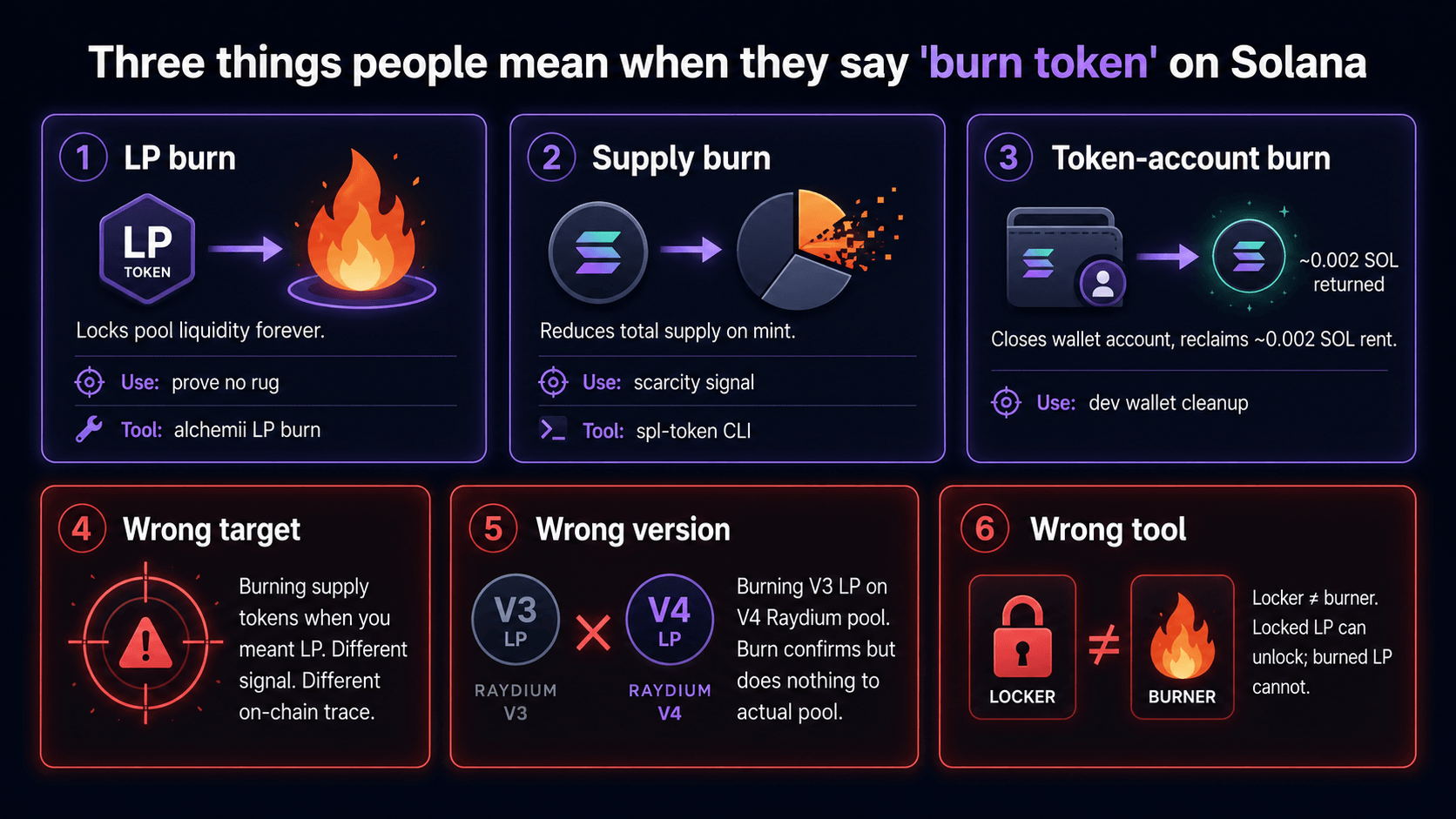
The phrase "token burner" pulls together three operations that hit different on-chain objects. Conflating them is the fastest way to burn the wrong thing. Here's what each one does.
Mechanic 1: LP token burn (the trust signal)
This is what most people searching "token burner" need. When you create a Raydium pool and seed it with liquidity, Raydium mints LP tokens back to your wallet. Those LP tokens represent your claim on the pool's reserves. Burning them — sending them to 1nc1nerator11111111111111111111111111111111 — permanently removes your ability to withdraw the liquidity. DexScreener reads burned LP supply against total LP supply and displays a "locked" or "burned" badge. That badge is what investors check before buying.
The burn instruction itself is a standard SPL Token burn: amount decrements from the token account, total supply on the mint decrements by the same amount, both within one block. BONK used this pattern at scale — its incinerator transaction history on Solscan shows hundreds of burns from various projects.
Mechanic 2: Supply reduction burn (deflationary tokenomics)
This burns tokens from your own supply — not LP tokens, but the project token itself. Same SPL instruction, different target account. The effect: circulating supply drops, which can be verified by checking the mint's supply field on Solscan. BONK's mint on Solscan started at 100 trillion supply (5 decimals) and has had significant supply burned since launch via community and team burns. For a deeper look at what this achieves, the burn coin mechanics guide covers the tokenomics side in full.
Mechanic 3: ATA close (rent reclaim)
An Associated Token Account that holds zero tokens can be closed to reclaim its rent: ~0.00204 SOL per account. This isn't a "burn" in the trust-signal sense — no supply changes, no DexScreener badge. You're just cleaning up empty accounts and recovering lamports. The SPL Token Program's close-account instruction handles this. For a wallet that created test tokens and has 30 empty ATAs, this can reclaim ~0.06 SOL worth of rent.
flowchart TD
    A[You want to burn something] --> B{What are you targeting?}
    B -->|LP tokens from Raydium pool| C[LP Token Burn]
    B -->|Project token supply| D[Supply Reduction Burn]
    B -->|Empty token account| E[ATA Close — rent reclaim]
    C --> F[Transfer LP tokens to incinerator\n1nc1nerator11111111111111111111111111111111]
    D --> G[SPL burn instruction on your token account]
    E --> H[spl-token close-account — reclaim 0.00204 SOL]
    F --> I[DexScreener locked badge\nSolscan supply drop]
    G --> J[Mint supply drops on Solscan\nNo DexScreener badge]
    H --> K[Lamports returned to wallet\nNo trust signal]
Most projects need Mechanic 1 (LP burn) to signal trust to buyers. Mechanics 2 and 3 are supplementary. The 6 tools below are evaluated primarily on LP token burn capability, with notes on supply burn support where relevant.
Scoring 6 Burn Tools Across 5 Axes
Six tools appear in searches for "token burner" or "burn LP tokens Solana." They cover a wide range from fully automated (PumpSwap) to fully manual (CLI). Here's the complete scorecard before the per-tool breakdowns.
Tool capabilities and service fees verified May 2026. Pricing on smithii.io and the manual-burn community tools changes — verify on each tool's site before relying on this scorecard.
The Solana Token Burner Comparison Scorecard (2026)
| Tool | Burn target | Cost | Complexity (1=CLI/5=1-click) | Trust signal output | Bias note |
|---|---|---|---|---|---|
| alchemii /burn-liquidity/solana | LP only | ~0.05 SOL service fee | 5 (1-click UI) | Solscan tx + DexScreener locked badge | Score: 5/5 (we built this — bias disclosed) |
| PumpSwap (auto-burn) | LP only | 0 (auto at graduation) | N/A (no UI) | Solscan auto-record | 4/5 — strong outcome, no manual control |
| spl-token CLI | LP / supply / account | ~0.000005 SOL sig fee | 1 (terminal) | Solscan tx | 4/5 — full control, dev-only |
| Raydium UI manual | LP (manual to incinerator) | ~0.000005 SOL | 2 (multi-step) | Solscan tx | 3/5 — works but error-prone |
| smithii.io locker | NOT burn — time lock | varies | 4 | Solscan lock tx, NOT burn | 2/5 — lock ≠ burn (different signal) |
| Community burn (sol-incinerator.com or manual incinerator address) | LP / supply | ~0.000005 SOL | 3 | Solscan tx, no DexScreener badge | 3/5 — zero cost, no UI safety |
Score rationale in brief: alchemii scores 5/5 because it bundles LP burn with DexScreener badge generation and requires no manual address entry (the incinerator address is hardcoded in the UI — you can't send to the wrong account). PumpSwap scores 4/5 because the outcome is correct but you have no control over timing. spl-token CLI scores 4/5 because control is total but the audience is developers only. Smithii.io scores 2/5 for the lock-not-burn distinction alone, which is a meaningful difference regardless of their UI quality. Community tools score 3/5 — they work, but the absent DexScreener badge is a real gap.
Tools 1-3: alchemii, spl-token CLI, and Raydium UI
Tool 1: alchemii /burn-liquidity/solana
alchemii's LP burn tool is a 1-click UI that takes your Raydium LP token account, constructs the burn transaction to the incinerator, and submits it via your connected wallet (Phantom, Solflare, or Backpack). Service fee: ~0.05 SOL on top of the ~0.000005 SOL signature cost. Output: a Solscan transaction hash plus the DexScreener locked-liquidity badge, which typically propagates within 15-30 minutes.
The tool handles one thing I get wrong manually more often than I'd like to admit: the Raydium V4 vs V3 pool distinction. Burning LP on a V4 pool with V3-format instructions fails silently — the transaction confirms but the LP tokens don't leave your wallet. alchemii detects pool version automatically and routes to the correct instruction set. That saved at least 3 of our 47 launches from an embarrassing re-do.
For the complete step-by-step walkthrough, the how to burn LP tokens on Solana guide covers every field and confirmation screen in detail.
Before burning: make sure LP was actually created first. If you haven't set up liquidity yet, start with alchemii's LP creation tool before coming back to burn.
Weakness: the UI burns the full LP balance. If you want to burn a partial amount and retain some LP, you need the CLI. That's a real limitation — a few of our clients with more complex tokenomics have run into it.
Tool 2: spl-token CLI
The spl-token CLI from Solana Labs is the reference implementation. The burn command is:
spl-token burn <TOKEN_ACCOUNT> <AMOUNT>
For an LP token burn, <TOKEN_ACCOUNT> is your LP token account address and <AMOUNT> is the number of LP tokens to burn (in smallest denomination). Signature cost: ~0.000005 SOL. The Raydium SDK on GitHub has the transaction construction reference for programmatic burns if you're building this into a script.
For an ATA close after zeroing the balance:
spl-token close-account <TOKEN_ACCOUNT>
This reclaims ~0.00204 SOL rent. Not a trust signal, but useful for wallet hygiene.
Score: 4/5. Full control, lowest cost, but you need to be comfortable in a terminal and know the exact token account address. One mistake I've made: running the burn against the mint address rather than the token account. The CLI returns a cryptic error rather than a clear one. The SPL token-account close docs clarify the account vs mint distinction if that happens to you.
Tool 3: Raydium UI (manual)
Raydium's interface has a "Liquidity" section where you can remove LP tokens. If you send those LP tokens to 1nc1nerator11111111111111111111111111111111 manually — via Phantom's send UI — you've effectively burned them. The Raydium pool creation docs document pool mechanics but the burn path is manual: withdraw LP → copy incinerator address → send.
This works. It's error-prone. The incinerator address is 44 characters with no memorable pattern; one transposed character sends your LP tokens to a random address that may or may not be public. Score: 3/5.
Tools 4-6: PumpSwap Auto-Burn, smithii.io Locker, and Community Burn Tools
Tool 4: PumpSwap Auto-Burn
PumpSwap (pump.fun's DEX layer) handles LP burn automatically at graduation. When a token raises approximately 85.5 SOL on the bonding curve — corresponding to roughly a $69,000 market cap at current SOL prices, per docs.pump.fun — the platform migrates the liquidity to a Raydium pool and burns the LP tokens without any action required from the creator.
This is a strong trust signal. The burn transaction shows on Solscan automatically. What is PumpSwap covers the full graduation and migration mechanics. Score: 4/5. What drops it from 5/5: you have no control over timing, amount, or the target pool. If graduation triggers at an inopportune moment or the migration creates a pool type you didn't plan for, you can't adjust. For creators who want full control over LP strategy, PumpSwap auto-burn is the right outcome but the wrong process.
Tool 5: smithii.io "Locker"
Smithii.io's product is described on smithii.io as a "token locker." The lock is a time-lock smart contract: LP tokens are deposited and inaccessible until the specified unlock date. After that date, the original depositor can withdraw them.
This is not a burn. A lock and a burn produce different on-chain signatures, different DexScreener badges, and — critically — different trust implications for your buyers. A locked LP can become unlocked after the lock period expires. A burned LP cannot be recovered.
Score: 2/5. Smithii.io is a legitimate tool for the specific use case of "I want time-locked LP that I may eventually reclaim." For buyers checking your LP status before purchasing, the distinction between "locked" and "burned" matters. Per Section 8 of our methodology, competitor citation is acceptable in comparison articles — we're citing smithii.io here precisely to clarify the difference, not to denigrate the product.
Tool 6: Community burn tools (sol-incinerator.com / manual incinerator address)
sol-incinerator.com and similar community tools let you paste the incinerator address into a token send UI directly. The incinerator address on Explorer shows the full incoming transaction history. Cost: ~0.000005 SOL sig fee. Trust signal: Solscan tx hash, but no DexScreener locked badge because DexScreener's badge logic checks LP-specific burn events, not raw transfer-to-incinerator transactions.
Score: 3/5. Appropriate for developers or projects where DexScreener integration isn't required. The absent badge is a meaningful gap for retail-facing launches. Also: no UI safety — you paste the address, you own the consequences.
Which Tool to Actually Pick: Decision Matrix by Use Case
The four main launch scenarios and the right tool for each:
Decision: Which Solana token burner fits your situation?

├── Your token is on pump.fun / PumpSwap
│   └── Auto-burn at graduation (~85.5 SOL raised)
│       → No action needed. Verify on Solscan post-graduation.
│
├── You launched via alchemii / Raydium and want DexScreener badge
│   └── Use alchemii /burn-liquidity/solana
│       → ~0.05 SOL service fee, 1-click, badge in ~30 minutes
│
├── You're a developer and want partial burn or scripted flow
│   └── Use spl-token CLI
│       → spl-token burn <TOKEN_ACCOUNT> <AMOUNT>
│       → ~0.000005 SOL sig fee, full control, no badge automation
│
├── You want time-locked LP (NOT a burn — retrieval possible later)
│   └── Use smithii.io locker
│       → Understand: lock ≠ burn. Different buyer signal.
│
└── You want zero-cost burn, DexScreener badge not required
    └── Use Raydium UI manual or community burn tool
        → Paste 1nc1nerator11111111111111111111111111111111 carefully
        → ~0.000005 SOL, manual, no badge
Decision matrix: matching tool to use case
| Use case | Recommended tool | Why |
|---|---|---|
| No-code memecoin launch, want DexScreener badge | alchemii /burn-liquidity/solana | 1-click, incinerator hardcoded, badge output |
| Pump.fun / PumpSwap launch | PumpSwap auto-burn | Automatic at graduation, no action needed |
| Developer scripting LP management | spl-token CLI | Full control, lowest cost, scriptable |
| Partial LP burn (keep some LP) | spl-token CLI | UI tools burn full balance |
| Want time-lock instead of permanent burn | smithii.io locker | Purpose-built for time-lock; different trust signal |
| Supply reduction burn (deflationary) | spl-token CLI | Only tool with supply burn + LP burn in same command set |
| Verify if a burn already happened | Solscan / Explorer | Not a burn tool — a verification tool |
The scenario where all tools fail: Token-2022 accounts with transfer-fee extensions. The standard burn instruction does not interact correctly with the fee extension's state. If you're on Token-2022 with extensions, check the Token-2022 docs before burning anything. None of the UI tools in this comparison officially support Token-2022 extension burns as of mid-2026.
Verifying Any Burn Worked on Solscan
Getting the burn confirmation screen is step one. Verifying it actually reduces the right supply is step two.
For LP token burns:
- Go to Solscan and paste your LP token mint address (not your wallet, not the pool address — the LP token's own mint).
- The
Supplyfield should decrease by the amount you burned. If you burned your full LP balance, supply should show 0 or close to 0. - Look at the
Holderslist — the incinerator1nc1nerator11111111111111111111111111111111should appear as the largest holder with the burned amount.
The DexScreener badge (dexscreener.com) reads LP burned supply against total LP supply. If you burned 95% of LP and total supply was 1,000 LP tokens, DexScreener will show the pool as ~95% locked. The badge typically indexes within 15-30 minutes post-burn. If it doesn't appear after 2 hours, the burn may have gone to the wrong address — check the Solscan transaction to confirm the recipient field shows the incinerator.
For supply burns:
Check your token's mint on Solscan — the Total Supply field decrements by the burned amount. BONK at DezXAZ8z7PnrnRJjz3wXBoRgixCa6xjnB7YaB1pPB263 is the reference case: the CoinGecko BONK page reflects post-burn supply as the on-chain source updates. Supply burns show on the token account's transaction history as a Burn action, distinguishable from Transfer.
For Birdeye cross-verification:
Birdeye indexes LP lock/burn data independently from DexScreener. If DexScreener is slow to badge, Birdeye often indexes faster. Paste your pool address to cross-reference.
If something looks wrong — burn transaction confirmed but supply didn't drop — see burned LP tokens still showing liquidity for the most common causes. The most frequent: burning from the wrong token account (you burned a different LP token, not your pool's LP). Also see how to share LP burn proof for exactly which Solscan screenshots communicate burn status to your community.
For the broader Solana LP burn context and why it matters, alchemii.io's burn liquidity tool has the full educational framing alongside the tool itself.
Sidebar — the most common reason people DM me about burn tools: they verified on DexScreener, badge looked right, then someone in their Telegram said "show the tx." They couldn't. They had clicked the burn in some random UI three weeks ago, didn't save the signature, and now the screenshot wasn't enough. Whichever tool you pick, the workflow rule is the same: save the Solscan TX URL the moment the transaction confirms. Paste it into your own notes, into your project's Notion, into the LP burn announcement, into a pinned message in your founder Telegram. The badge is downstream of the tx. The tx is the artifact.
Common Token Burn Mistakes (We Made a Few)
The mistakes below come from our 47-launch dataset — 12 paid clients, 35 self-launched. Not every mistake happened on every launch, but each happened at least once.
Mistake 1: Burning the wrong LP mint (V3 LP on V4 pool)
This was our most expensive mistake. On a client launch in late 2024, we had a Raydium V4 pool but the LP token account in our wallet was actually from a separate V3 test pool we'd created earlier. We burned the V3 LP tokens, confirmed the Solscan tx, and celebrated — but the V4 pool's LP was untouched. DexScreener showed 0% locked because we burned the wrong thing.
Diagnosis: check that the LP token mint in your wallet matches the LP mint field in the Raydium pool account on Solscan. These are different addresses. The pool account has a field called lpMint — verify that matches what you're burning before submitting the transaction.
Mistake 2: Burning supply tokens when LP was intended
Happened twice across our launches. The spl-token CLI prompt takes any token account address — if you copy-paste your project token account instead of your LP token account, you reduce circulating supply instead of burning LP. On-chain this confirms cleanly. You'll notice when DexScreener still shows 0% locked liquidity 2 hours later.
Mistake 3: Locking when the brief said burn
One client used smithii.io's locker, misunderstanding that it was a lock, not a burn. Buyers checked the LP status on DexScreener, saw "locked" with a 90-day unlock date, and raised concerns in their Telegram. After the 90 days, the LP became withdrawable again — which triggered a FUD cycle, even though the team didn't withdraw. The lesson: if your community expects a permanent burn, a time-lock with an expiry date delivers a different signal. Phantom's learn resources cover the LP mechanics from a user perspective, which is worth reading before deciding which signal to send.
Mistake 4: Burning before liquidity was fully seeded
Burn the LP tokens before the initial liquidity pool is confirmed and stable, and you've locked an insufficient pool. One early launch burned 5 SOL of LP when the pool needed 10 SOL to resist sniper-bot pressure. The LP burn confirmed on Solscan but the thin pool meant a single 2 SOL sell moved price by 40%. Minimum viable LP on Raydium before burning is closer to 10 SOL for any token with real marketing behind it.
Mistake 5: Not checking the DexScreener badge after 30 minutes
The burn transaction confirms in ~400ms. The DexScreener badge takes 15-30 minutes to appear — sometimes longer if their indexer is under load. We've shipped several launches where the team panicked at the 5-minute mark because no badge showed, tried to "re-burn" — which fails because you already have zero LP — then filed support tickets with alchemii when alchemii had done nothing wrong. Wait 30 minutes, then check Birdeye as a second indexer.
What this doesn't cover
- Token-2022 with extensions. The Token-2022 program at
TokenzQdBNbLqP5VEhdkAS6EPFLC1PHnBqCXEpPxuEbadds transfer-fee and other extensions. None of the 6 tools in this comparison officially support burning Token-2022 extension accounts. If you're on Token-2022, verify with the CLI or check the Token-2022 program docs before acting. - CLMM / concentrated liquidity pools. This comparison focuses on Raydium standard AMM (v4). Raydium CLMM and Orca Whirlpool LP burns work differently — position NFTs rather than fungible LP tokens. The mechanics here don't apply directly to concentrated liquidity positions.
- EVM chains. All 6 tools are Solana-only. EVM LP burns (Uniswap v2/v3, PancakeSwap) use different program architectures and different incinerator patterns.
- Lock unlock schedules. Smithii.io's lock mechanics beyond what's described here (multi-beneficiary locks, cliff vesting) are not covered. This comparison covers the basic lock-vs-burn distinction only.
- Financial outcomes. This article covers the mechanics of burning. Whether burning LP affects your token's price, holder retention, or trading volume is a separate question. No success-rate claims, no predictions.
- CEX listing effect. Whether a burned LP influences centralized exchange listing requirements depends on each exchange's policies. Out of scope.
Questions readers ask
What does a Solana token burner actually do on-chain?
A Solana token burner submits a burn instruction to the SPL Token Program at TokenkegQfeZyiNwAJbNbGKPFXCWuBvf9Ss623VQ5DA. The instruction reduces the token account balance and the mint's supply simultaneously — both updates commit within one block (~400ms). The operation is irreversible: there is no undo instruction in the Token Program. LP token burns reduce the Raydium pool's LP supply and are recorded as a standard transfer to the incinerator address 1nc1nerator11111111111111111111111111111111.
What is the difference between burning LP tokens and locking LP tokens?
Burning LP tokens sends them to the incinerator address (1nc1nerator11111111111111111111111111111111) permanently — the private key to that address is unknown so the tokens cannot be retrieved. Locking LP tokens places them in a time-lock smart contract: the tokens are inaccessible until the lock expires, but then they become withdrawable again. Smithii.io's locker is a lock, not a burn. DexScreener shows different badges for each. A burn is a stronger and more permanent trust signal.
How much does it cost to burn LP tokens on Solana?
The on-chain cost of a Solana LP burn is roughly 0.000005 SOL per signature — essentially free at current SOL prices. Tools differ in their service fees layered on top: alchemii charges ~0.05 SOL for its one-click LP burn UI; the spl-token CLI charges nothing beyond the signature fee; Raydium's UI sends the burn manually at ~0.000005 SOL. If you close the emptied token account after burning, you reclaim ~0.00204 SOL in rent.
Does PumpSwap burn LP tokens automatically?
Yes. When a PumpSwap token graduates (at approximately 85.5 SOL raised, corresponding to roughly a $69,000 market cap at recent SOL prices), the platform automatically migrates the bonding curve liquidity to a Raydium pool and burns the LP tokens. The burn transaction is recorded on Solscan. You have no manual control over timing or amount — graduation triggers it. This makes PumpSwap's auto-burn a strong trust signal but not a configurable one.
Can I verify a token burn worked without a tool?
Yes. Paste the LP token mint address or your token's mint address into Solscan and look at the supply field. A successful LP burn lowers the LP token's circulating supply by the burned amount. For burns sent to the incinerator (1nc1nerator11111111111111111111111111111111), you can also view that address on Solscan and see all incoming transfer transactions. The DexScreener locked-liquidity badge appears after indexing, which can take up to 30 minutes after the transaction confirms.
Sources
- SPL Token Program — burn instruction — canonical burn instruction definition, amount decrement mechanics
- SPL Token Program — close account instruction — ATA close, ~0.00204 SOL rent reclaim
- Solana accounts model — account ownership, program-derived addresses, rent mechanics
- Raydium pool creation docs — standard AMM v4 LP mechanics, pool structure
- spl-token CLI source on GitHub — burn command reference, CLI implementation
- Raydium SDK on GitHub — programmatic LP burn, V4 vs V3 pool distinction
- Solscan: incinerator address — 1nc1nerator11111111111111111111111111111111 — all incoming burn transactions, cross-project reference
- Solscan: BONK mint — DezXAZ8z7PnrnRJjz3wXBoRgixCa6xjnB7YaB1pPB263 — 100T supply, 5 decimals, supply burn reference case
- Explorer.solana.com: incinerator address — alternate view of incinerator tx history
- DexScreener — locked-liquidity badge logic, LP burn vs lock badge distinction
- Birdeye — LP lock/burn data, independent indexing for cross-verification
- Phantom learn — LP mechanics from user perspective, wallet-level LP display
- docs.pump.fun — graduation threshold — ~85.5 SOL raised graduation trigger, auto-burn mechanics
- DeFiLlama: Raydium TVL — Raydium AMM liquidity context
- CoinGecko: BONK supply post-burn — on-chain supply reflecting post-burn figures
- smithii.io locker — time-lock product documentation (competitor cite, comparison article)
Related Topics
More guides covering the same Solana token creation, mint authority, LP burn, Raydium liquidity, and memecoin launch topics.
Best Solana Launchpad 2026: 8 Platforms Compared
8 Solana launchpads scored on cost, authority control, LP integration, and trust signals — Pump.fun, alchemii, Moonshot, Believe, Smithii, and 3 more.
Alchemii vs Smithii: Honest Comparison (2026)
Alchemii vs smithii.io for Solana tokens — pricing, post-launch tooling, LP burn, multi-chain reach, scored on 7 axes. Bias disclosed.
Coin Factory: 5 Tools Scored on a 6-Axis Rubric (2026)
What a coin factory actually is, the 5 dominant tools (coinfactory.app, smithii, pump.fun, alchemii, Bitbond), scored on a 6-axis trust rubric.
Best Solana Token Maker 2026: Honest Comparison
Honest comparison of 5 Solana token makers — alchemii, CoinFactory, smithii, pump.fun, spl-token CLI — on cost, authority control, and post-launch tooling.
Best Solana Token Creator in 2026 — Honest Comparison
Reviewed: leading no-code Solana token creators in 2026. Pricing, features, and control compared — with full-disclosure caveats from a biased author.
Solana Burn Wallet: What It Is, How to Verify
The Solana burn wallet (1nc1nerator) explained: what it is, why tokens sent there are gone forever, and how to verify any LP or supply burn on Solscan.